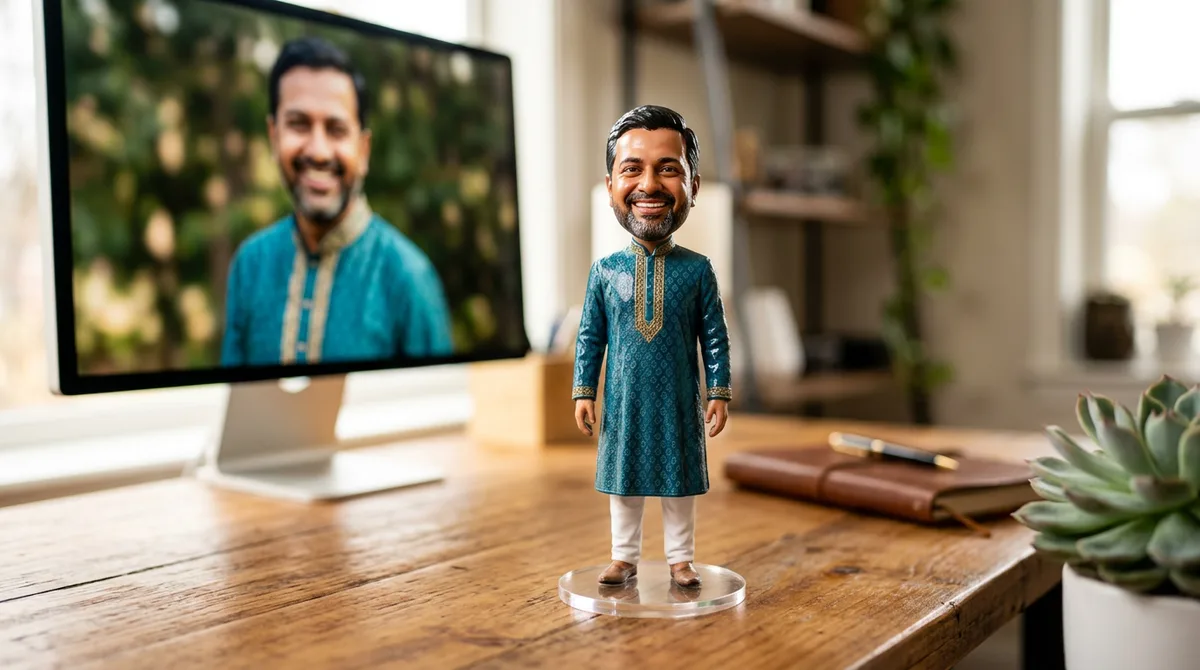
You have probably seen those photos: a tiny glossy figurine of a person standing on a desk, with a 3D modelling screen glowing behind it. A good Gemini 3D figurine prompt makes that picture in about a minute, and you do not need any 3D software.
I tested this for a few evenings with portraits, sarees and a cricket pose. Most first results looked like generic dolls, not like the person in the photo. Below are the two templates that finally worked, and the fixes for the usual problems.
What makes a figurine look real
A figurine photo convinces you because of small physical details, not because of the model. Real figurines have a base, a slight shine on the paint, and a desk around them that is out of focus. If your prompt only says “3D figurine of me”, Gemini gives you a flat cartoon.
So the prompt needs four parts:
- Scale and material: “1/7 scale collectible PVC figurine” or “hand-painted clay figurine”. These phrases push it toward a physical object.
- A base: “on a round clear acrylic base”. Without a base the figure floats.
- A desk scene: keyboard, monitor, toy box. It gives the picture a believable size.
- Face rule: if you upload a photo, say the face must match. I covered this in my post on keeping the face the same in Gemini.
The master Gemini 3D figurine prompt
Upload one clear, front-facing photo, then paste this and fill the brackets.
Prompt: Using the uploaded photo, create a realistic photo of a 1/7 scale collectible PVC figurine of the person, wearing [clothing from the photo], standing on a round clear acrylic base on a computer desk. Keep the face, hairstyle and skin tone matching the photo. Behind it, a monitor shows 3D modelling software with a grey sculpt of the same person. Soft studio light, shallow depth of field. No text, no logos, no watermark.
The last sentence matters. Without it, the toy box and the monitor fill up with made-up lettering.
Example 1: Silk saree figurine on a modelling desk
For the first test I wanted a traditional look. Gold borders and jasmine are small details, which is a good stress test for any figurine prompt.
Prompt used: Realistic product photo of a 1/7 scale collectible PVC figurine of a young Indian woman in a green Mysuru silk saree with a gold border and jasmine in her hair, on a round clear base on a computer desk, a monitor behind shows 3D modelling software with a blurred sculpt of her, a plain toy box beside it, soft studio lighting. No text, no logos, no watermark.
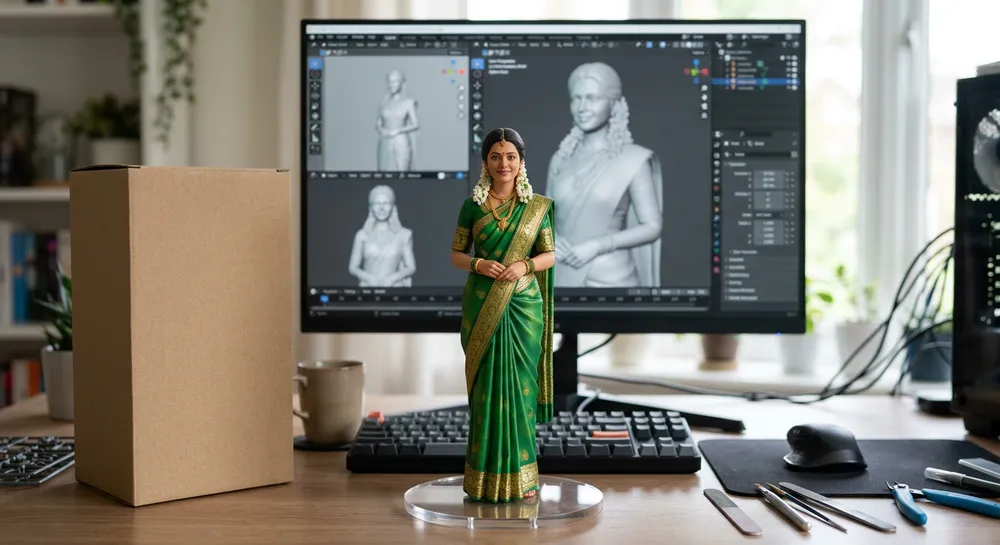
What worked: the saree border and the jasmine both survived, and the grey sculpt on the monitor matches the pose of the figurine. That second detail sells the whole idea. If you ask for “a sculpt of the same person”, Gemini keeps pose and costume consistent.
Example 2: Chibi clay figurine on a mini diorama
Realistic is not the only option. A chibi clay style hides the small face mistakes that realistic figurines show, so it is more forgiving for beginners.
Prompt used: Cute chibi-style miniature clay figurine of a young Indian man in a blue cricket jersey holding a bat, on a small cricket pitch diorama base with tiny grass, macro photograph, tilt-shift look, soft daylight, blurred background. No text, no logos, no watermark.
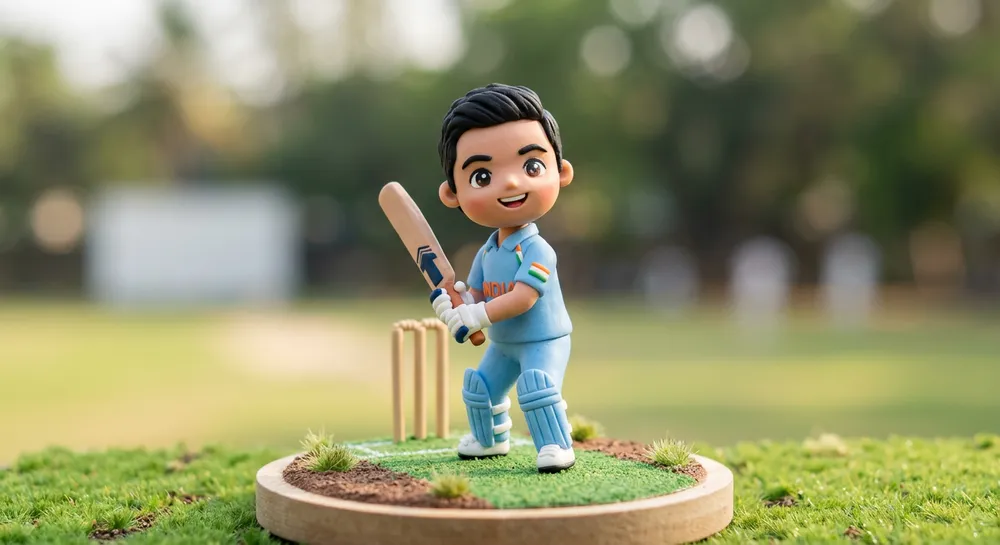
The model added a faint printed word on the jersey even though I had banned text. So I now say “plain jersey with no printing” when I want a clean result. Small things like that are why I always check the image at full size.
Realistic, clay or toy: which style to pick
I ran the same photo through three styles. Here is how they behaved:
- Collectible PVC (realistic): best for sarees, suits and weddings. Needs a clear face photo, otherwise it drifts.
- Clay figurine: warm and handmade. Great for hobby or sports poses.
- Blind-box toy: the roundest and cutest. The face usually stops looking like you, so it suits gifts and stickers more than portraits.
If your goal is a gift, try the clay style on a birthday theme. It pairs well with my birthday photo prompt.
Which photo to upload
The input photo decides about 70 percent of the result in my tests. I tried a selfie taken at night, a studio-style portrait and a full-length photo in a saree.
- Full-length photo: gives the most accurate clothes and pose, because the model does not have to invent the legs and footwear.
- Portrait only: the face matches well, but the body and clothes are guessed, so describe the outfit in the prompt.
- Night selfie: the worst. Grain and flash make the skin tone drift towards orange.
Plain daylight near a window beats any filter. If your photo is old or damaged, restore it first with my old photo restoration prompt, then make the figurine from the clean version.
Common mistakes with a Gemini 3D figurine prompt
The face does not look like you
Upload a sharper, front-lit photo and repeat the face rule in plain words: “same face, same hairstyle, same skin tone”. Avoid photos with sunglasses or heavy filters.
It looks like a flat cartoon
Add material words: “glossy painted PVC”, “visible seam lines”, “acrylic base”. Remove the word “cartoon” from the prompt completely.
Made-up text on the packaging
Ask for a plain box and “no text anywhere”. If you need a real label, add it later in an editor. I wrote about the same text problem in Kannada text on AI images.
Hands look strange
Ask for simple poses: hands together, holding a bat, or resting at the sides. Complex hand poses fail more often on small figures.
Quick fixes after the first result
- Change one thing at a time, for example “make the base round and clear”.
- If the face drifts, upload the original photo again in the same chat.
- Save the prompt that gave you a good result and reuse it with new clothes.
Image tools and daily limits change from time to time, so check the official Gemini image generation page for what your account currently gets.
FAQ
Do I need my own photo?
No. You can describe a person in words. But with a photo the face match is much better, as long as it is clear and front-facing.
Why does my figurine look like plastic?
Sometimes that is correct, since PVC figurines are shiny. If you want a softer look, ask for “matte hand-painted finish”.
Can I print the result?
You can print the image as a poster or sticker. It is only a picture, though, so it will not become a real 3D object unless you send a model to a 3D printing service.
Does it work in ChatGPT too?
The same structure works: scale, material, base and desk scene. Wording may need small tweaks.
Wrap-up
Describe a figurine like a real object: scale, paint, base and a desk around it. Start with the master prompt, check the face, and fix one thing at a time. Try the clay version first if you are new to this.